2022-06-01
基础介绍
Boost 是一个用于 C++ 的开源库集合,提供了许多扩展标准库功能的工具和组件。它由多个独立的库组成,每个库都旨在解决特定的编程问题,从而提高代码的复用性和可维护性。Boost 库被认为是标准库的试验场,其中许多库最终被纳入 C++ 标准库(如 C++11 和 C++17)。
以下是对 Boost 库的一些详细介绍:
Boost 的特点
- 开源和免费:Boost 是一个开源项目,任何人都可以免费下载和使用。
- 跨平台:Boost 支持多种操作系统和编译器,具有良好的跨平台兼容性。
- 高质量和高性能:Boost 库经过广泛的测试和优化,提供了高效的实现。
- 广泛使用:许多 Boost 库已经被纳入 C++ 标准库(如智能指针、正则表达式、线程库等)。
常用的 Boost 库
1. 智能指针(Smart Pointers)
智能指针是用于自动管理动态内存的工具。Boost 提供了多种智能指针类型,如 shared_ptr、unique_ptr 和 weak_ptr。
1#include <boost/shared_ptr.hpp>
2#include <iostream>
3
4int main() {
5    boost::shared_ptr<int> p(new int(10));
6    std::cout << *p << std::endl;
7    return 0;
8}
2. 正则表达式(Regex)
Boost.Regex 提供了强大的正则表达式支持,用于字符串匹配和替换。
 1#include <boost/regex.hpp>
 2#include <iostream>
 3#include <string>
 4
 5int main() {
 6    std::string s = "Boost Libraries";
 7    boost::regex expr{"\\w+\\s\\w+"};
 8    if (boost::regex_match(s, expr)) {
 9        std::cout << "String matches the regular expression." << std::endl;
10    }
11    return 0;
12}
3. 文件系统(Filesystem)
Boost.Filesystem 提供了跨平台的文件系统操作功能,如路径操作、文件读取和写入等。
 1#include <boost/filesystem.hpp>
 2#include <iostream>
 3
 4int main() {
 5    boost::filesystem::path p{"example.txt"};
 6    if (boost::filesystem::exists(p)) {
 7        std::cout << "File exists." << std::endl;
 8    } else {
 9        std::cout << "File does not exist." << std::endl;
10    }
11    return 0;
12}
4. 线程(Thread)
Boost.Thread 提供了多线程编程的支持,包括线程管理、互斥锁、条件变量等。
 1#include <boost/thread.hpp>
 2#include <iostream>
 3
 4void threadFunction() {
 5    std::cout << "Hello from thread!" << std::endl;
 6}
 7
 8int main() {
 9    boost::thread t{threadFunction};
10    t.join();
11    return 0;
12}
5. 序列化(Serialization)
Boost.Serialization 提供了序列化和反序列化 C++ 对象的功能。
 1#include <boost/archive/text_oarchive.hpp>
 2#include <boost/archive/text_iarchive.hpp>
 3#include <fstream>
 4
 5class MyClass {
 6public:
 7    int data;
 8    template<class Archive>
 9    void serialize(Archive & ar, const unsigned int version) {
10        ar & data;
11    }
12};
13
14int main() {
15    MyClass obj{42};
16    std::ofstream ofs("file.txt");
17    boost::archive::text_oarchive oa(ofs);
18    oa << obj;
19
20    MyClass newObj;
21    std::ifstream ifs("file.txt");
22    boost::archive::text_iarchive ia(ifs);
23    ia >> newObj;
24
25    std::cout << newObj.data << std::endl;
26    return 0;
27}
安装和使用 Boost
安装
Boost 可以从 Boost 官网 下载。安装过程如下:
- 下载并解压 Boost 库。
- 在命令行中导航到解压后的目录。
- 运行以下命令以构建 Boost 库:
1./bootstrap.sh
2./b2
使用
在使用 Boost 库时,需要将 Boost 包含路径和库路径添加到编译器的选项中。例如,使用 g++ 编译器时:
1g++ -I /path/to/boost_1_72_0 your_program.cpp -o your_program -L /path/to/boost_1_72_0/stage/lib -lboost_system
编译好的安装包下载:Boost官网
https://sourceforge.net/projects/boost/files/boost-binaries/
在Visual Studio中的配置
下载好了之后,解压到指定的文件夹中。
右击项目之后进入属性选项:
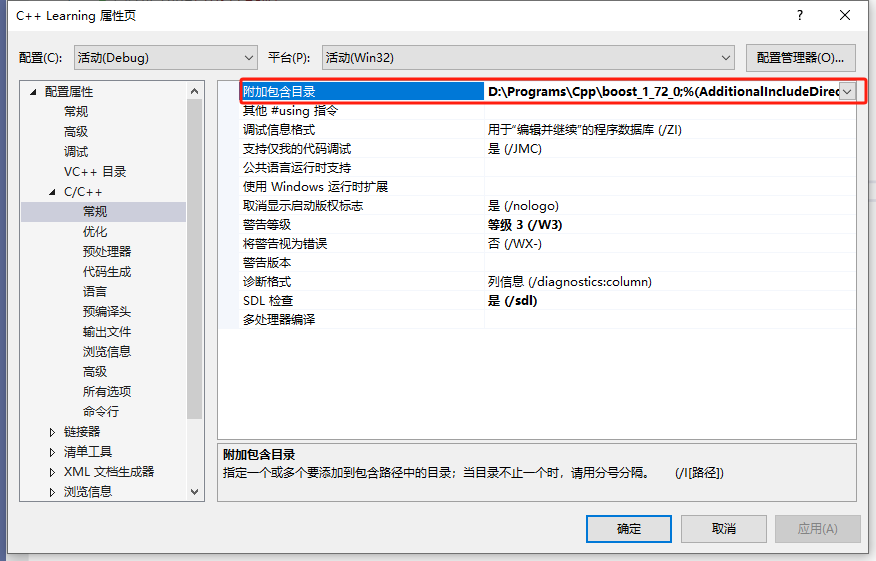
配置好解压缩的地址之后,在项目中就可以使用boost库了。
— END —